
Depending on the nature of your programming language, the contents of your source code, and the options you have selected, the documentation generated by Universal Report will contain a subset of the following items:

General information: Global information about the program
Quantitative information: Counting and mesure of programming items
List of files: Exhaustive list of files and associated information
Classes/Structures: List and description of structures and classes.
Forms description: Screenshots and controls/procedures
List of routines: Exhaustive list of routines and associated information
List of variables: Exhaustive/grouped list of variables
Routines relationship: Routines global/local call graph
Forms diagram: Forms hierarchy 
Database report: Description of the database structure
Glossary: Structured list of words in the header comments
Files display: Display of program/header files
Routines description: Header information and code
Changes report: Differences between two versions 
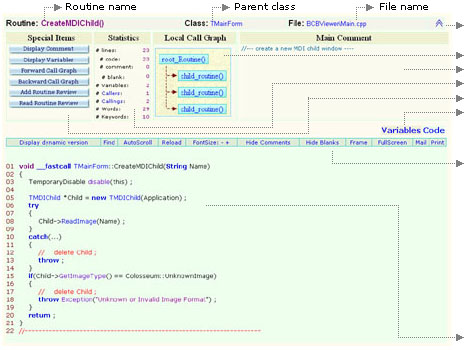
Details about all these items are developped in the corresponding set of well structured and formatted html pages, that can be accessed following the above links. Moreover, the interconnection between logical elements are implemented by hyperlinks targeting popup windows, with an in-place shortview display in certain cases. Graphs like the routines call diagrams are represented with dynamic structure (each node can be collapsed/exanded, and the content of the corresponding item is displayed by a click). Although everything is intuitive in the html documentation, we need to give more details about the way each routine is described, since it is the base piece of the report.
 
      
Each routine is a Unievrsal Report documentation is described as follows:
Click here to collapse or expand the routines header.
Routines local call graph (forward and/or backward).
Routines header comment (click to open in popup).
Routines quantitative information.
Buttons giving access to specialized topics and features.
Click to display the information about routines variables.
This line displays a set of commands that apply on the code bellow. For instance, comment lines (resp. blank lines) can be hidden and displayed as desired. The command display dynamic version activates a block dynamic mode. In that mode, each logical block of the code can be highlighted, hidden, displayed, and opened independently in a popup window (useful if we want to concentrate on that block). Click again on the same link (changed to display static version) to back to normal mode. Whatever the active mode, the other commands remain available and relevant.
Formatted routines code. Note that any line can be anotated by clicking on its number (e.g: 01 02 ...).